Get client sign-off from one link.
Review together live, or leave timestamped comments, voice notes and drawings. Clients join in the browser, no account needed.
“I absolutely love this. It’s way more affordable than Frame.”
“I've been using OpenFrame for the last two months, and everything is going smoothly.”
Live review
Watch together. Point it out.
Play, pause and seek in sync with your client. Draw directly on the frame and save the feedback as a timestamped comment.
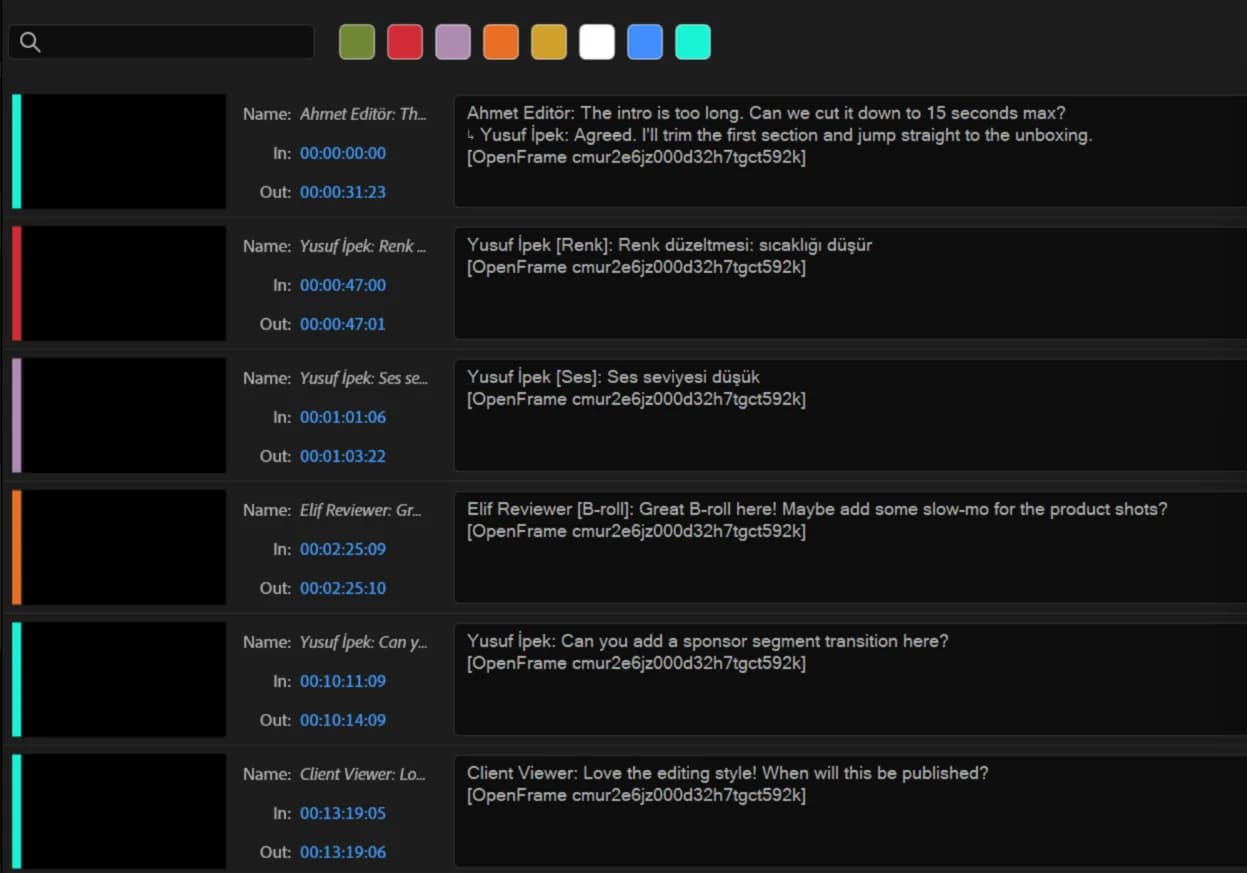
Feedback lands on your timeline.
Send every comment to Premiere Pro or DaVinci Resolve as a colored marker on the right frame, replies included. After the next round, one click updates them.
See exactly what changed.
Put two cuts on one timeline and scrub them together, then approve without asking which version this is.
Say it, or draw it.
Record a note or circle the frame, and both land on the exact second instead of in a follow-up email.
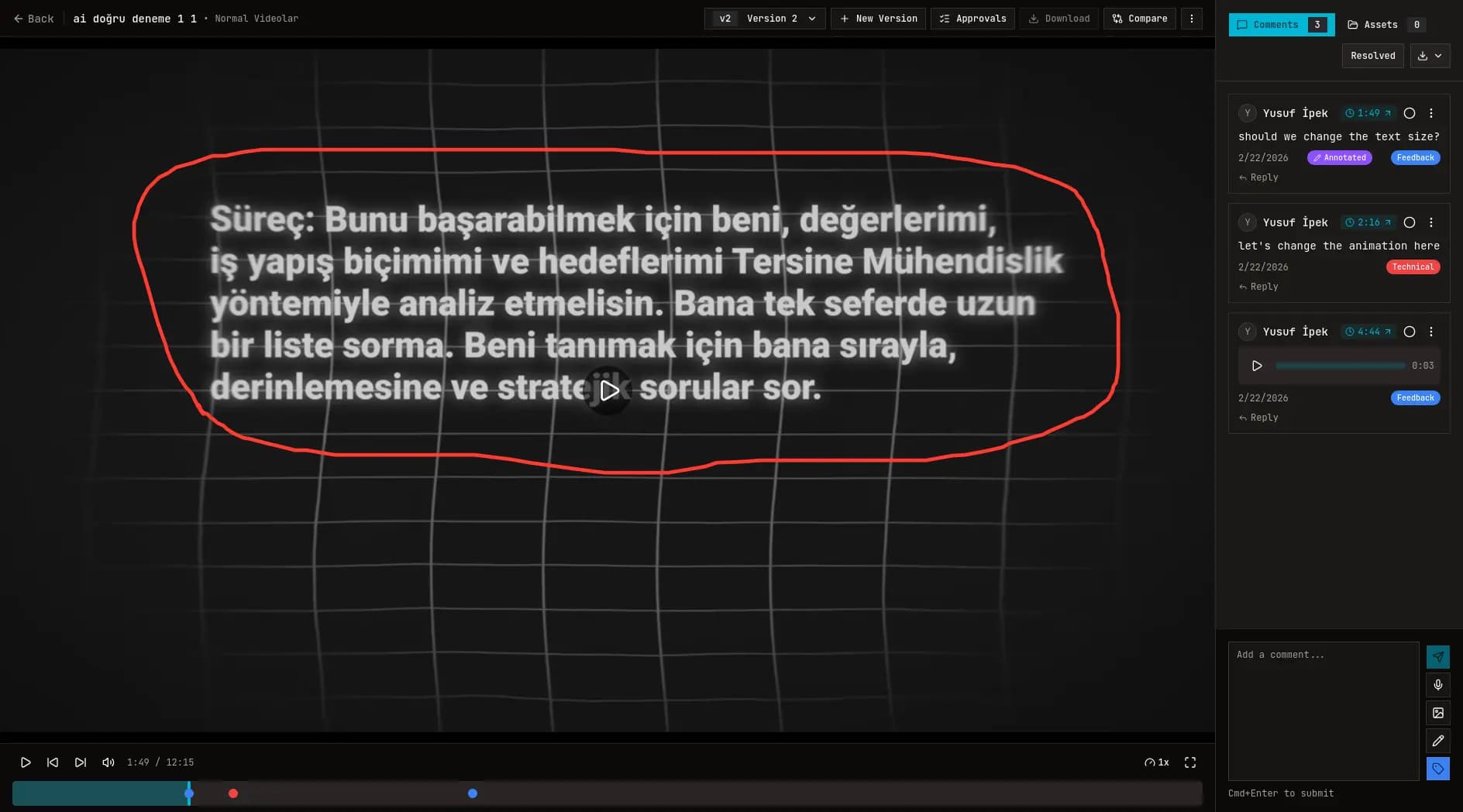
This block needs to clear the subject, I drew where it should sit.
One link, one approval.
Decide what the link allows, send it, and get an Approved status you can point at later.
From upload to approval, in one flow.
Four steps, one linkLet us run it, or run it yourself.
No per-seat feesReviewers are always free. You only pay for the people who upload.
- 1 editor
- 200 GB storage, add 100 GB for $5/mo
- Unlimited reviewers and clients
- Live review sessions, up to 10 participants
- Comments, voice notes, annotations
- Version compare, history, approvals
- Permissioned share links, PDF and CSV export
- Unlimited unlisted YouTube imports
- Unlimited editors
- 1 TB storage, add 100 GB for $5/mo
- Unlimited reviewers and clients
- Live review sessions, up to 10 participants
- Comments, voice notes, annotations
- Version compare, history, approvals
- Permissioned share links, PDF and CSV export
- Unlimited unlisted YouTube imports
- Full source code, read it and audit it
- Docker setup for self-hosting
- Every release becomes Apache 2.0 two years after publication
Tell us your storage, usage and workflow, we will recommend the right approach. Hosted, self-hosted, or a mix of both.
Need it on your own servers, or a setup built for you? Write to us
Questions people ask.
[email protected]How does live review work?
Start a live review on an uploaded video and invite your client through a share link with commenting enabled. Up to 10 participants can watch in sync, draw on the frame, and save their drawings as timestamped comments. Live review does not include voice or video calls and is not available for YouTube imports.
Do clients need an account?
No. They can review in the browser with a share link.
Is OpenFrame open source?
OpenFrame is Fair Source, licensed under the Functional Source License (FSL). You can read and audit the full source code and self-host it, and every release automatically becomes Apache 2.0 open source two years after publication.
Is there a free trial?
Yes. Hosted Cloud starts with a 7-day free trial and never asks for a card to begin it. After that, Solo is $10/mo ($96/yr) for one editor and Studio is $29/mo ($290/yr) for unlimited editors. Reviewers and clients are always free, with no per-seat fees on either plan.
How is this different from a Google Drive link?
Drive does not give timestamped discussion, voice notes, annotations, or version compare, which is where approval time is actually saved.
What happens if I exceed my storage?
Solo includes 200 GB and Studio 1 TB. Either plan can add storage in 100 GB blocks for $5/mo, up to 300 GB extra on Solo and 1 TB extra on Studio. When storage is full, uploads pause; nothing is deleted and you are never billed for overage. If you need much more, contact us at [email protected].
Can I self-host?
Yes. The full source code is public and ships with a Docker setup for self-hosting. Hosted Cloud is for teams who want zero setup.